

Solutions, end-to-end.
From point-of-sale systems to custom software and websites — we design, build, install and support it all.
All solutions
- 01
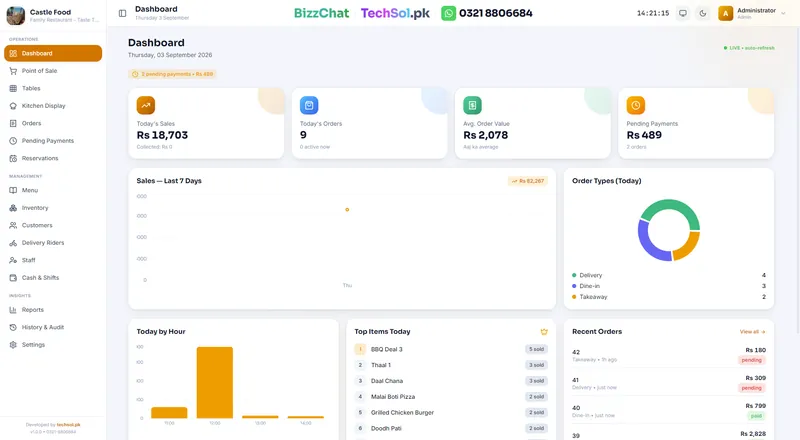
Restaurant & Kitchen POS
Live orders, kitchen display, tables, billing & inventory.
- 02
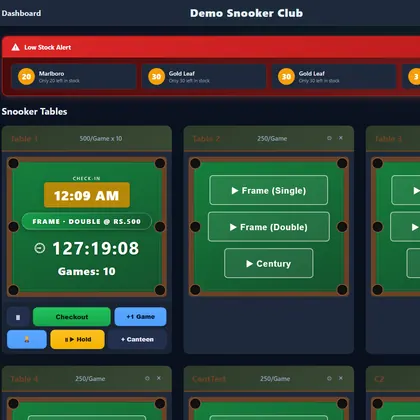
Snooker Club Systems
Per-table timers, cafe orders, memberships & clean nightly reports.
- 03
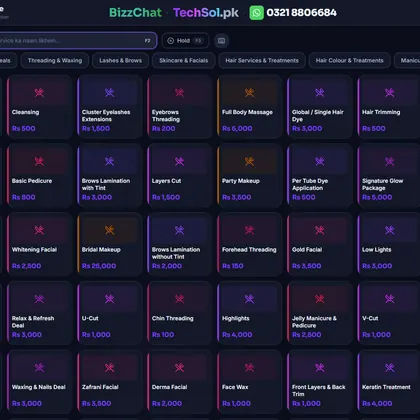
Salon & Spa POS
Appointments, stylists, services, billing & client history.
- 04
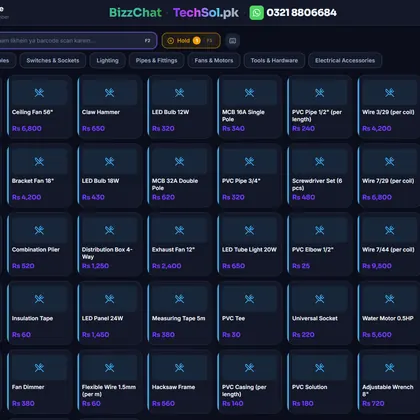
Hardware & Electric POS
Barcode billing, inventory, low-stock alerts, profit & suppliers.
- 05
Web Development
Any type of website — business, e-commerce, portfolio, landing & web apps.
- 06
Custom Software
Bespoke desktop, web & mobile apps designed around your workflow.
- 07
Cloud & Sync
Multi-branch sync, cloud backups & a dashboard from your phone.
- 08
Setup & Support
We install, train your team in plain language, and stay reachable.
WhatsApp +92 321 8806684 ↗
Wire up your shop. Live.
Pick your business and the gear around the till — the diagram connects it all to TechSol POS. Send the finished setup to us for a quote.
1 · Your business
2 · Around the counter
3 · Counters
Your restaurant setup
Kitchen POS
TechSol POS
Every setup includes installation, training in Urdu & English, and WhatsApp support.
- Royal Kitchen
- Eagle Snooker
- Daawat Biryani
- Palace Cue Club
- Urban Cafe
- Spice Route
- Restaurant POS
- Snooker clubs
- Salon & spa
- Hardware & retail
- Websites
- Custom apps
- Cloud sync
- Real support
Before you pick a system.
Straight answers. Anything else, one WhatsApp message gets a real person.
01Which POS is right for a restaurant, a snooker club, a salon or a shop?
Restaurants, takeaways and cafes use Kitchen POS (orders, kitchen display, tables, receipts and inventory). Snooker and pool clubs use Snooker Manager (per-minute table timers, cafe orders on the same bill, memberships). Salons and spas use Salon POS (appointments, stylists, services and client history). Hardware, electrical, pharmacy and general stores use Retail POS (barcode billing, stock, suppliers and profit).
02What hardware do I need for a POS system?
A Windows PC or laptop at the counter is enough to start. Most shops add a 58 mm or 80 mm thermal receipt printer, and retail shops add a barcode scanner. A kitchen screen, cash drawer and phone dashboard are optional. Tell us what you already have and we will tell you what, if anything, to add.
03Can I run more than one counter or branch?
Yes. Several counters can work on one system, and branches can sync to the cloud so the owner sees every branch's sales, stock and pending payments on one phone dashboard, with backups behind it.
04How long does it take to set up?
It depends on the size of the setup, and we give you the timeline up front with the quote. One of our clients switched over a single weekend — installed on Saturday, trained on Sunday, open on Monday.
05Can you build something that is not on this list?
Yes. Beyond our ready systems we build custom desktop, web and mobile apps and business websites. Describe how your work runs today and we will tell you honestly what it would take.

Not sure which one fits?
Describe how your counter works today and we will tell you honestly whether we have something for it.